

Kiro
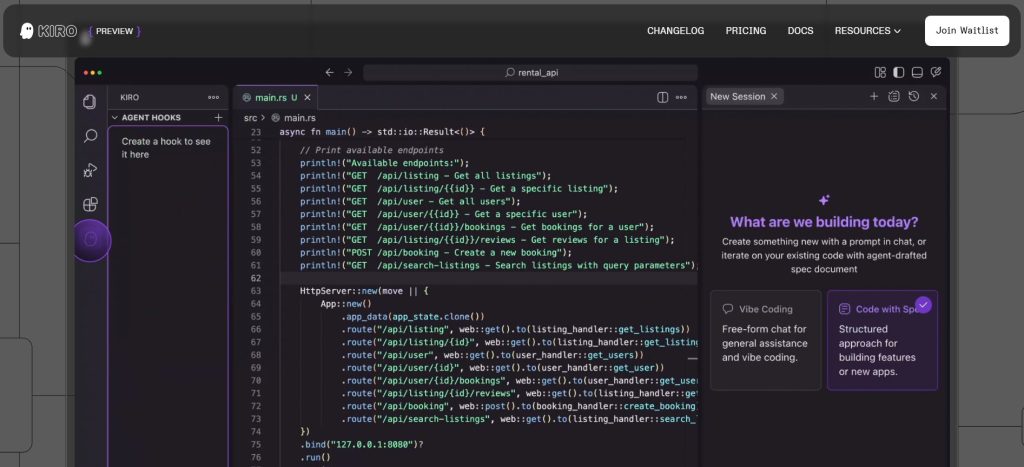
Kiro is an AI-powered Integrated Development Environment (IDE) developed by xAI (an Amazon initiative). Kiro helps developers go from concept to production with spec-driven development, turning prompts into detailed specifications, working code, documentation, and tests. It aims to bridge the gap between rapid AI-generated prototypes and maintainable, production-ready systems.
Key Features & Capabilities
- AI-Native IDE: Integrates AI directly into the development environment, focusing on agentic development where AI agents can take autonomous, goal-driven actions.
- Spec-Driven Development: Translates plain language prompts into structured specifications (requirements, design, and tasks) before code generation begins, ensuring clarity and reducing errors.
- Agent Hooks: An event-driven automation framework that triggers AI actions in response to file changes (save, create, delete) or manual triggers, for tasks like updating tests, documentation, or scanning for security issues.
- Multi-File Context & Goal-Oriented Development: Kiro analyzes and edits multiple files across your project to fulfill broader requests like “add user authentication” or “create a REST API.”
- Transparent Actions: Every change Kiro makes is shown in a task window, allowing developers to review, modify, or reject before applying.
- Agent Steering: A system for providing persistent project knowledge through markdown files, capturing product purpose, technical constraints, and coding standards, ensuring AI behavior aligns with project conventions.
- Model Context Protocol (MCP) Integration: Allows Kiro to securely connect to external data sources, private knowledge bases, and specialized tools without exposing sensitive information.
- Code Generation & Refactoring: Generates new files, creates APIs, fixes bugs, and cleans up code structure.
- Code Explanation & Debugging: Can explain functions, modules, or entire architectures, and helps trace errors and suggest fixes based on error messages and logs.
- VS Code Compatibility: Built on an open-source VS Code base, allowing it to leverage familiar workflows, plugin compatibility, and easy migration of user settings.
How to Use Kiro
Kiro is an installable AI IDE that can be run locally. Here’s a general overview of how to use Kiro:
- Installation: Download and install Kiro on your development environment (available for Linux, Windows, and macOS).
- Project Setup: Connect Kiro to your local development environment and project directory. It can create initial spec files (
requirements.md,design.md,tasks.md). - Define Goals (Prompts): Describe what you want to build or achieve in natural language. Kiro will then break it down into structured components and generate a plan.
- Utilize AI Features: Allow Kiro to investigate your codebase, open relevant files, and modify them to fulfill your request. You can also ask for explanations or debugging assistance.
- Review & Approve Changes: Kiro will present its proposed changes. You can review, modify, or approve these changes before they are applied to your codebase.
- Leverage Agent Hooks: Set up automated agent hooks to trigger tasks like running tests, linting code, or generating documentation on file events (e.g., saving a file or committing to Git).
- Monitor & Iterate: Continuously use Kiro to refine your project, maintain documentation, and ensure code quality throughout the development lifecycle.
Common Use Cases for Kiro
- Full-Stack Development: Excels at handling entire development projects, generating components for both frontend and backend.
- Production-Ready Software Development: Helps developers move prototypes to production by enforcing structure, generating documentation, and ensuring code quality.
- Large Projects & Monorepos: Especially useful for managing complex, multi-file projects where context switching and understanding legacy code can be challenging.
- Onboarding into Unfamiliar Codebases: Assists new developers in quickly understanding existing code and architecture through explanations and context awareness.
- Automated Code Review & Quality Gates: Uses agent hooks to automatically review and optimize code, run tests, and scan for security issues, ensuring consistent code quality.
- Reducing Technical Debt: Helps in refactoring work and maintaining consistency between planned design and implemented code.
Frequently Asked Questions (FAQ)
Q: What is Kiro?
A: Kiro is an AI-powered Integrated Development Environment (IDE) that uses agentic AI to help developers go from concept to production with spec-driven development, automating various aspects of software creation and maintenance.
Q: How does Kiro use AI?
A: Kiro uses AI for generating detailed specifications, writing and refactoring code, explaining code and architecture, debugging, setting up agent hooks for automation, and maintaining project consistency.
Q: Is Kiro easy to use?
A: Kiro aims to simplify the development process with a focus on goal-oriented actions and transparent feedback, providing a familiar experience for VS Code users while enhancing it with AI.
Q: What are the benefits of using Kiro?
A: Benefits include faster delivery of production-ready code, reduced mental load for developers, improved code quality, better documentation, and streamlined project management, especially in complex environments.
Q: Does Kiro support specific programming languages?
A: Kiro currently supports popular languages like Python, JavaScript, and TypeScript, with active development for additional language support.
Q: Can Kiro generate documentation automatically?
A: Yes, Kiro can automatically generate and update documentation based on code changes and specifications, helping to preserve institutional knowledge.
Q: Is Kiro free to use?
A: Kiro is free during its preview phase, with a tiered subscription model planned for general availability, including a free tier with limited agent interactions.
Q: What kind of support does Kiro offer?
A: Support options include official documentation, tutorials, and community resources, with access to AWS support channels for potential issues.
Explore and learn about File extensions

No results available
ResetReviews
Kiro has received 0 reviews with an average rating of out of 5
Kiro Website Information
- Category: AI, AI Coding, Coding & Development
- Platform: Website
- License Type: Website
- Published: July 19, 2025
- Website: Kiro
Alternative version of Kiro
Alternative to Kiro


There are no similar listings
Reset